Feeling uncertain about what to expect in your upcoming interview? We’ve got you covered! This blog highlights the most important Knowledge of Oracle interview questions and provides actionable advice to help you stand out as the ideal candidate. Let’s pave the way for your success.
Questions Asked in Knowledge of Oracle Interview
Q 1. Explain the difference between COMMIT, ROLLBACK, and SAVEPOINT.
COMMIT, ROLLBACK, and SAVEPOINT are crucial Transaction Control Language (TCL) commands in Oracle used to manage the changes made within a transaction. Think of a transaction as a single unit of work; either all changes are saved permanently, or none are.
COMMIT: This command permanently saves all changes made within a transaction to the database. It’s like finalizing a sale – once committed, the changes are irreversible. Example: After successfully updating a customer’s address, you’d use COMMIT to ensure the change is written to the database.
ROLLBACK: This command undoes all changes made within a transaction since the last COMMIT or the start of the transaction. It’s like hitting the ‘undo’ button. Imagine you made a mistake while updating multiple records; ROLLBACK lets you revert to the previous state. This is essential for data integrity.
SAVEPOINT: This allows you to create checkpoints within a larger transaction. You can then roll back to a specific SAVEPOINT, undoing only the changes made after that point. It’s like setting a bookmark within your work. This granular control is vital for complex transactions where you want to manage changes incrementally. Example: SAVEPOINT before_update; UPDATE customers SET address = 'New Address' WHERE id = 1; ROLLBACK TO before_update; This will update the address and then roll back only that specific change.
Q 2. What are the different types of joins in SQL?
SQL joins combine rows from two or more tables based on a related column between them. They are fundamental for retrieving meaningful data from a relational database.
- INNER JOIN: Returns only the rows where the join condition is met in both tables. It’s like finding the common ground. Example: Finding customers who have placed orders.
- LEFT (OUTER) JOIN: Returns all rows from the left table (the one specified before
LEFT JOIN), even if there is no match in the right table. Unmatched rows from the right table will haveNULLvalues in the columns from that table. It’s like showing all customers, even if they haven’t placed an order. - RIGHT (OUTER) JOIN: Similar to
LEFT JOIN, but returns all rows from the right table, even if there’s no match in the left table. It shows all orders even if there’s no associated customer (which would indicate data inconsistencies). - FULL (OUTER) JOIN: Returns all rows from both tables. If a row has a match in the other table, the corresponding columns are filled; otherwise,
NULLvalues are used. It’s like showing everything from both sides, regardless of whether there’s a connection. - SELF JOIN: Joins a table to itself, usually to compare rows within the same table. This is useful for hierarchical structures. For instance, finding employees and their managers within the same employee table.
Q 3. Describe the different levels of Oracle database security.
Oracle database security operates at multiple levels to protect data integrity and confidentiality. These levels work together to create a robust security posture.
- Network Security: This is the first line of defense, involving firewalls, network segmentation, and restricting access to the database server based on IP addresses or subnets. Think of it as the gatekeeper to your database.
- Database User Accounts and Privileges: Each user is granted specific privileges (
SELECT,INSERT,UPDATE,DELETE) on specific tables or database objects. The principle of least privilege applies – only grant the minimum necessary access to each user. This is like assigning specific roles and responsibilities to employees. - Data Encryption: Data can be encrypted at rest (while stored on disk) and in transit (while being transmitted across the network) to protect against unauthorized access. Think of this as securing your documents with a strong lock and key.
- Access Control Lists (ACLs): ACLs provide fine-grained control over access to database objects, enabling you to grant privileges to specific users or roles. This offers even more granular control than basic user privileges.
- Auditing: Database activity can be audited to track user actions and detect suspicious behavior. Auditing provides a trail of all activities for security and accountability purposes. It’s like having security cameras monitoring the database for any unusual activity.
- Database Vault: A highly secure component for controlling access to sensitive data, including encryption and policy enforcement. This is the ultimate security layer for highly confidential data.
Q 4. How do you perform database backups and recovery in Oracle?
Oracle offers robust backup and recovery mechanisms to ensure business continuity and data protection. The method chosen depends on the size of the database, recovery time objectives (RTO), and recovery point objectives (RPO).
Backup Methods:
- Full Backup: A complete copy of the database. It’s time-consuming but provides a complete recovery point.
- Incremental Backup: Backs up only the data that has changed since the last full or incremental backup. This is faster than full backups but requires the full backup to restore.
- Logical Backup: Backs up the database at the data-file level. This is useful for backups of specific schemas or tables. It’s often used in conjunction with physical backups.
Recovery: Oracle uses Redo Logs to track changes made to the database. In case of failure, these logs are used to replay the changes and recover the database to a consistent state.
Tools: RMAN (Recovery Manager) is the recommended tool for managing backups and recovery. It provides a command-line interface and offers various features like backup scheduling, validation, and recovery options.
Example using RMAN (simplified):
RMAN> CONNECT TARGET; RMAN> BACKUP DATABASE; RMAN> BACKUP ARCHIVELOG ALL; These commands initiate a full database backup and a backup of the archive logs. Recovery involves using RMAN to restore the backup and apply the archive logs.
Q 5. Explain the concept of Oracle Data Guard.
Oracle Data Guard provides high availability and disaster recovery for Oracle databases. It creates a standby database that maintains a near-synchronous copy of the primary database. Imagine it as a mirror image of your primary database.
How it Works: The primary database sends redo logs to the standby database, which applies these logs to keep its copy up-to-date. Different protection modes offer varying levels of synchronicity and data protection.
- Maximum Availability: Offers the highest level of protection with near-synchronous replication. Minimal data loss in case of primary database failure. This mode is ideal when very low RTO is required.
- Maximum Protection: Emphasizes data protection with asynchronous replication. It may lead to slightly higher RTO but better data protection.
- Maximum Performance: Prioritizes primary database performance. Replication is less frequent, resulting in potentially larger RTO.
Benefits: Reduced downtime, improved data protection, and enhanced business continuity. In a disaster scenario, the standby database can quickly take over as the primary database.
Q 6. What is RAC (Real Application Clusters) and how does it work?
Real Application Clusters (RAC) allows multiple instances of an Oracle database to run concurrently on different servers, sharing the same storage. Think of it as having multiple servers working together as a single database.
How it Works: RAC utilizes clusterware to manage the instances and ensure high availability. The instances work together to handle user requests and distribute the workload. This eliminates a single point of failure, enhancing performance and scalability.
Benefits: Increased availability, improved performance, better scalability, and simplified administration. RAC allows for handling very high transaction volumes while remaining highly available.
Key Components:
- Clusterware: Software that manages the cluster environment, handling failover and resource management.
- Global Cache: Enables the instances to share data consistently, eliminating the need for data duplication.
- Interconnect: High-speed network connection between the servers in the cluster.
Q 7. How do you troubleshoot performance issues in an Oracle database?
Troubleshooting performance issues in an Oracle database requires a systematic approach. It’s like being a detective investigating a crime scene.
Step-by-Step Approach:
- Identify the Problem: Determine the symptoms of the performance issue – slow queries, long waits, high CPU usage, etc. Gather performance metrics to quantify the problem.
- Gather Information: Use Oracle’s performance monitoring tools (e.g., AWR, Statspack, SQL*Developer) to collect data on database activity, resource usage, and wait events.
- Analyze the Data: Focus on the areas with the highest resource consumption or the longest wait times. Analyze slow SQL queries using tools like SQL*Developer and explain plans.
- Identify the Root Cause: Based on the analysis, pinpoint the root cause of the performance problem. This could be anything from inefficient queries or indexes to hardware limitations or configuration issues.
- Implement Solutions: Apply appropriate solutions based on the root cause. These may include optimizing queries, creating or rebuilding indexes, adding more hardware resources, or adjusting database configuration parameters.
- Monitor and Test: After implementing changes, monitor the system to ensure that the performance has improved. Test the changes to validate their effectiveness.
Key Tools and Techniques:
- Automatic Workload Repository (AWR): Provides historical performance data, allowing you to identify trends and bottlenecks.
- SQL*Developer: A graphical tool for analyzing SQL queries and creating explain plans.
- Explain Plans: Help to understand how Oracle executes a query, identifying opportunities for optimization.
- Monitoring CPU utilization, memory usage, I/O wait times, and other system metrics.
Q 8. Explain the concept of indexes and their benefits.
Indexes in Oracle are similar to the index in the back of a book. They speed up data retrieval by creating a separate data structure that points to the location of rows in a table based on specific columns. Instead of scanning the entire table, Oracle can use the index to quickly locate the relevant rows, significantly improving query performance.
Benefits:
- Faster Data Retrieval: Indexes drastically reduce the time it takes to fetch data, especially for large tables.
- Improved Query Performance: Queries that utilize indexes execute much faster, resulting in better application responsiveness.
- Enhanced Data Integrity (in some cases): Unique indexes can prevent duplicate entries, thus ensuring data quality.
- Optimized Joins: Indexes can accelerate the join operations between tables.
Example: Imagine a table of customer information with millions of rows. A query to find all customers in a specific city would be incredibly slow without an index on the ‘city’ column. With an index, Oracle can quickly locate the relevant rows, making the query execute almost instantly.
Q 9. What are the different types of indexes in Oracle?
Oracle offers several index types, each with its strengths and weaknesses:
- B-tree Index: The most common type, suitable for equality and range searches (e.g., WHERE city = ‘London’ or WHERE salary BETWEEN 50000 AND 100000). It’s efficient for both exact and range queries.
- Bitmap Index: Best for columns with low cardinality (few distinct values). Ideal for columns like gender or status, improving performance for queries filtering on these columns. They are very space-efficient for low-cardinality columns.
- Function-Based Index: Indexes on expressions or functions applied to columns. For instance, you could index
UPPER(name)to efficiently search for names regardless of case. - Reverse Key Index: Used to optimize queries with leading wildcards (e.g.,
WHERE name LIKE '%Smith'). A normal index is inefficient for these kinds of queries. - Composite Index: An index on multiple columns. The order of columns is crucial for performance, as the optimizer uses the leading columns first for filtering.
- Domain Index: Created on a domain. This index can be used by multiple tables that share a common domain.
Choosing the right index type is crucial for optimization. The choice depends on factors like data distribution, query patterns, and table size.
Q 10. How do you monitor database performance?
Monitoring Oracle database performance is crucial for maintaining application responsiveness and identifying potential bottlenecks. A multi-faceted approach is key:
- Oracle’s built-in monitoring tools: Utilize tools like AWR (Automatic Workload Repository), ADDM (Automatic Database Diagnostic Monitor), and Statspack to analyze database activity, identify resource contention, and pinpoint performance issues. AWR is particularly useful for long-term performance trends.
- SQL performance analysis: Examine slow-running SQL queries using tools like SQL*Plus and TKProf (or the DBMS_PROFILER package). Focus on queries with high execution times and resource consumption.
- Operating system monitoring: Check the server’s CPU usage, memory utilization, I/O performance, and network traffic. Resource constraints on the operating system can affect database performance.
- Third-party tools: Consider using third-party monitoring and performance management tools for comprehensive insights and alerts.
- Regular Health Checks: Establish a routine of performance checks, including regular review of performance metrics, slow query logs, and resource usage.
Analyzing these metrics will help you identify slow queries, resource bottlenecks, and areas for optimization.
Q 11. What are materialized views and when would you use them?
Materialized views are pre-computed results of SQL queries that are stored in the database as tables. They act like a cache for frequently accessed data, significantly speeding up query execution.
When to use them:
- Read-heavy workloads: When a particular query is executed repeatedly and the underlying data doesn’t change frequently.
- Complex queries: Materialized views can simplify complex queries, making them execute much faster.
- Reporting and analytics: They’re ideal for generating summary reports, because the pre-computed data is readily available.
Example: A reporting application that regularly generates sales reports for different regions. A materialized view summarizing sales data by region would drastically improve report generation time. However, the materialized view will need to be refreshed periodically to reflect changes in the underlying data.
Important Note: Maintaining materialized views involves space overhead and refresh overhead, thus careful consideration is needed.
Q 12. Explain the concept of partitioning in Oracle.
Partitioning in Oracle divides a large table into smaller, more manageable pieces called partitions. This technique offers several advantages:
- Improved Performance: Queries accessing only a portion of the data need only scan the relevant partition(s), making them significantly faster.
- Simplified Data Management: Operations like dropping or reorganizing a partition are generally faster and less disruptive than doing the same for the whole table.
- Enhanced Data Warehousing: Partitioning facilitates efficient data loading and purging in data warehousing applications.
- Better Scalability: Partitioning can improve scalability by distributing data across multiple disks or storage devices.
Types of Partitioning:
- Range Partitioning: Partitions are based on a range of values in a specified column.
- Hash Partitioning: Partitions are based on a hash function applied to a specified column, distributing rows evenly across partitions.
- List Partitioning: Partitions are based on a list of values in a specified column.
- Composite Partitioning: Combines range and hash or list partitioning.
Example: A large table storing order data could be partitioned by year or month, allowing faster access to orders from a specific period.
Q 13. Describe different ways to optimize SQL queries.
Optimizing SQL queries is crucial for database performance. Strategies include:
- Using Indexes Appropriately: Ensure appropriate indexes are created on frequently queried columns. Avoid over-indexing, as it can negatively impact performance during inserts and updates.
- Writing Efficient Queries: Avoid using functions or calculations within the WHERE clause, especially those that prevent index usage.
- Using Hints (With Caution): Hints can force the optimizer to use a specific plan but should be used sparingly and only when absolutely necessary, and with a deep understanding of their impact.
- Analyzing Execution Plans: Use tools to analyze the execution plans to identify bottlenecks and inefficient parts of the query.
- Avoiding Full Table Scans: These are generally inefficient, and indexes should be used to avoid them.
- Query Rewriting: Rewrite poorly performing queries using more efficient techniques. Sometimes, restructuring the logic will yield better performance.
- Data Type Optimization: Using appropriate data types can reduce storage space and improve performance.
- Regular Statistics Gathering: Keeping statistics up-to-date helps the optimizer make informed decisions.
Example of inefficient query: SELECT * FROM customers WHERE TO_CHAR(birthdate, 'YYYY') = '1980'; This would be inefficient because TO_CHAR prevents the use of an index on the birthdate column. A better approach might be to add a column for the birth year and index that column.
Q 14. What is PL/SQL and how does it differ from SQL?
PL/SQL (Procedural Language/SQL) is Oracle’s procedural extension to SQL. While SQL is declarative (you specify *what* you want), PL/SQL is procedural (you specify *how* to get it).
Key Differences:
- Programming Constructs: PL/SQL supports procedural programming constructs like loops (
FOR,WHILE), conditional statements (IF-THEN-ELSE), exception handling, and subprograms (procedures, functions, packages). SQL lacks these features. - Data Handling: PL/SQL allows for the declaration and manipulation of variables, while SQL operates primarily on sets of data.
- Error Handling: PL/SQL’s exception handling mechanism enables robust error management, something that’s generally missing in SQL.
- Code Reusability: PL/SQL supports subprograms and packages that facilitate code reusability and modularity, promoting better code organization and maintenance.
Example: A PL/SQL stored procedure might be used to automate a complex business process, such as validating data entered by a user, updating multiple tables, and then sending an email notification. This could not be done efficiently using SQL alone.
In essence, PL/SQL empowers you to write more complex and powerful database applications that go beyond simple data retrieval and manipulation.
Q 15. Explain the concept of transactions in Oracle.
In Oracle, a transaction is a sequence of operations performed as a single logical unit of work. Think of it like a bank transaction: you either deposit or withdraw money; you can’t do both partially. The key principle is atomicity – either all operations within a transaction succeed, or none do. This ensures data integrity and consistency.
Oracle manages transactions using the concept of commit and rollback. A COMMIT statement saves all changes made within the transaction to the database permanently. A ROLLBACK statement undoes all changes, reverting the database to its state before the transaction began.
Example: Imagine updating an inventory after a sale. You’d decrease the quantity of the sold item and increase the sales total. This entire process should be a single transaction. If the quantity update fails, the sales total shouldn’t be updated, ensuring data accuracy. This is managed by using a transaction block:
BEGIN
UPDATE inventory SET quantity = quantity - 1 WHERE item_id = 123;
UPDATE sales SET total_sales = total_sales + 100;
COMMIT;
EXCEPTION
WHEN OTHERS THEN
ROLLBACK;
END;
Career Expert Tips:
- Ace those interviews! Prepare effectively by reviewing the Top 50 Most Common Interview Questions on ResumeGemini.
- Navigate your job search with confidence! Explore a wide range of Career Tips on ResumeGemini. Learn about common challenges and recommendations to overcome them.
- Craft the perfect resume! Master the Art of Resume Writing with ResumeGemini’s guide. Showcase your unique qualifications and achievements effectively.
- Don’t miss out on holiday savings! Build your dream resume with ResumeGemini’s ATS optimized templates.
Q 16. What are stored procedures and how are they used?
Stored procedures are pre-compiled SQL code blocks stored in the database. They encapsulate a set of SQL and PL/SQL statements, offering several advantages. Think of them as reusable functions for your database. They enhance code reusability, improve performance (due to pre-compilation), and help enforce data integrity.
Stored procedures are used for various tasks: performing complex database operations, encapsulating business logic, improving security by restricting direct SQL access, and centralizing data modification logic.
Example: A stored procedure could automate the process of adding a new customer to the database, including checking for duplicate entries and validating data before insertion. This would be far more efficient than writing the entire SQL code repeatedly.
CREATE OR REPLACE PROCEDURE add_customer (p_name VARCHAR2, p_address VARCHAR2)
AS
BEGIN
-- Logic to add customer
INSERT INTO customers (name, address) VALUES (p_name, p_address);
COMMIT;
EXCEPTION
WHEN DUP_VAL_ON_INDEX THEN
DBMS_OUTPUT.PUT_LINE('Duplicate customer found');
ROLLBACK;
END;
/
Q 17. How do you handle database errors in PL/SQL?
Error handling in PL/SQL is crucial for robust applications. The EXCEPTION block is used to catch and handle errors. This prevents your application from crashing and allows for graceful error recovery. The WHEN OTHERS clause catches any unhandled exception.
Instead of relying solely on WHEN OTHERS, which can mask unexpected errors, it’s better practice to handle specific exception types whenever possible. Oracle provides many predefined exceptions, such as NO_DATA_FOUND, DUP_VAL_ON_INDEX, and SQLCODE and SQLERRM to get the error code and message.
Example: A procedure might gracefully handle the case where a customer record is not found, providing a user-friendly message instead of a cryptic error.
DECLARE
  customer_name VARCHAR2(50);
BEGIN
  SELECT name INTO customer_name FROM customers WHERE id = 123;
  DBMS_OUTPUT.PUT_LINE('Customer name: ' || customer_name);
EXCEPTION
  WHEN NO_DATA_FOUND THEN
    DBMS_OUTPUT.PUT_LINE('Customer not found.');
  WHEN OTHERS THEN
    DBMS_OUTPUT.PUT_LINE('An error occurred: ' || SQLERRM);
END;
Q 18. Explain the concept of triggers in Oracle.
In Oracle, triggers are stored procedures automatically executed in response to certain events on a particular table or view. They’re like automated actions that happen behind the scenes. Think of them as event listeners for your database.
Triggers can be used to enforce data integrity (e.g., ensuring that values are within a specific range), audit changes (logging modifications to a separate table), and perform cascading actions (automatically updating related tables).
Triggers are categorized by the event (INSERT, UPDATE, DELETE) and timing (BEFORE, AFTER). A BEFORE trigger acts before the event occurs and can modify the data. An AFTER trigger acts after the event and can’t modify the data but can perform actions based on the changes.
Example: A trigger could automatically update a timestamp column whenever a row is updated in a table, recording when the last modification occurred.
CREATE OR REPLACE TRIGGER update_timestamp
BEFORE UPDATE ON employees
FOR EACH ROW
BEGIN
  :NEW.last_updated := SYSDATE;
END;
/
Q 19. What are cursors in PL/SQL?
In PL/SQL, a cursor is a pointer to a result set, essentially a temporary work area that stores the data retrieved from a SQL query. They are necessary to process multiple rows returned by a query one at a time. Think of it like a row-by-row reader for your query results.
Cursors are essential when you need to process the results of a query individually, performing actions on each row. They are declared, opened, fetched, and closed. There are implicit and explicit cursors; implicit cursors are automatically managed by Oracle for single-row operations. Explicit cursors provide more control over data processing for multi-row queries.
Example: Iterating through customer records and sending each one an email:
DECLARE
  c_customer SYS_REFCURSOR;
  v_customer_id NUMBER;
  v_customer_email VARCHAR2(100);
BEGIN
  OPEN c_customer FOR SELECT id, email FROM customers;
  LOOP
    FETCH c_customer INTO v_customer_id, v_customer_email;
    EXIT WHEN c_customer%NOTFOUND;
    -- Send email to v_customer_email
    DBMS_OUTPUT.PUT_LINE('Email sent to: ' || v_customer_email);
  END LOOP;
  CLOSE c_customer;
END;
Q 20. Describe different ways to manage database space.
Managing database space is vital for optimal performance and preventing database growth issues. Oracle offers several strategies:
- Regular Monitoring: Use tools like
DBA_SEGMENTS,DBA_DATA_FILES, and other performance views to regularly track space usage. - Data Archiving: Move older, less frequently accessed data to cheaper storage, such as tape or cloud storage.
- Table Partitioning: Split large tables into smaller, more manageable partitions, improving query performance and allowing for easier data management. This is especially useful for tables with large numbers of rows.
- Index Optimization: Regularly review and optimize indexes. Too many indexes can negatively impact write performance. Removing unused indexes frees up space.
- Data Compression: Reduce the physical size of data using Oracle’s compression features, saving storage space.
- Adding Data Files: Increase storage capacity by adding new data files to the database. This should be done with careful planning and consideration for balanced storage across multiple disks.
- Recycle Bin: Utilize the recycle bin to recover accidentally deleted data. This can help prevent the need to recreate data and free up space in the regular tablespace after purging.
The best strategy depends on the specific needs of the database and the type of data stored. A combination of these techniques is often the most effective approach.
Q 21. Explain the architecture of an Oracle database.
The Oracle database architecture is a complex, multi-layered system. It can be broadly categorized into several key components:
- Instance: The set of background processes and memory structures that provide services to the database. It’s the software that runs the database.
- Database: The physical data files and associated metadata that store the actual data and information about the data. It’s the data itself.
- System Global Area (SGA): Shared memory region used by the database instance to cache data, control information, and shared data structures. This speeds up access to frequently used data.
- Program Global Area (PGA): Private memory allocated to each user session. It holds data related to a specific user’s connection and operations.
- Background Processes: Various processes running within the instance managing tasks like database recovery, archiving, and monitoring.
- Memory Management: The instance manages the memory shared between different processes and caches, crucial for performance.
- Storage Management: How the database organizes and manages the storage of data, including tablespaces, data files, and control files.
This architecture allows for efficient data management, scalability, and high availability. Understanding this layered structure is key to optimizing performance and troubleshooting issues.
Q 22. How do you manage user accounts and privileges in Oracle?
Managing user accounts and privileges in Oracle involves leveraging roles, profiles, and system privileges to control access to database objects and functionalities. Think of it like a well-guarded castle: roles are like groups of knights, each with specific duties (privileges); profiles define the limits of those duties (resource limits); and system privileges are the ultimate authority, allowing access to the most sensitive areas.
Roles: These are named collections of system and object privileges. Granting a role to a user automatically grants them all the privileges associated with that role. For example, a role named ‘SALES_READER’ could grant SELECT access to all tables related to sales data.
GRANT SALES_READER TO user1;Profiles: Profiles manage resource consumption, setting limits on connect time, CPU usage, and memory allocation. They control how much ‘work’ a user can do. For example, a profile might limit a user to 10 concurrent sessions to prevent them from hogging resources.
CREATE PROFILE my_profile LIMIT SESSION_PER_USER 10;System Privileges: These are the highest level of privileges, granting control over aspects of the database itself, like creating tables, managing users, or shutting down the database. Examples include CREATE TABLE, CREATE USER, and SHUTDOWN.
GRANT CREATE TABLE TO user2;
By combining roles, profiles, and system privileges, you can meticulously control which users can access which data and perform what actions, ensuring the security and integrity of your Oracle database.
Q 23. What is the difference between physical and logical backups?
The key difference between physical and logical backups lies in what they actually back up. A physical backup is a direct copy of the database files – think of it as a precise image of the database’s hard drive. A logical backup, on the other hand, copies the data itself, typically as a set of SQL statements that could rebuild the database. Imagine a blueprint versus the actual building; the blueprint is the logical backup, and the building is the physical one.
Physical Backup: These backups are usually faster to perform and recover from, because it’s just copying files. They’re great for complete database restoration but might not be ideal for specific point-in-time recovery of a single table. Tools like RMAN (Recovery Manager) excel at this.
Logical Backup: These are better for selective data recovery, allowing you to restore individual tables or data subsets. They’re also helpful for moving data to another database (though database schema compatibility needs to be considered).
EXPandIMP(Export and Import) utilities were traditionally used; now Data Pump (expdpandimpdp) is preferred for its speed and efficiency.
The best approach often involves a combination of both physical and logical backups to provide a robust disaster recovery strategy. A full physical backup is usually made weekly; incremental physical backups are taken more frequently. Logical backups are created for specific needs like database migration or detailed point-in-time recovery of smaller subsets of data.
Q 24. How do you implement database security best practices?
Implementing database security best practices is crucial for maintaining data integrity and confidentiality. This involves a multi-layered approach focusing on authentication, authorization, encryption, auditing, and physical security.
Strong Authentication: Enforce strong passwords and use multi-factor authentication to prevent unauthorized access.
Principle of Least Privilege: Grant users only the necessary privileges to perform their duties – don’t give everyone administrator access.
Data Encryption: Encrypt sensitive data both in transit (using SSL/TLS) and at rest (using Transparent Data Encryption – TDE).
Regular Auditing: Log and monitor database activity to detect and prevent malicious actions. Tools like Oracle’s auditing features and dedicated security information and event management (SIEM) systems are invaluable.
Database Firewall: Implement a database firewall to control network access and prevent unauthorized connections to the database server.
Vulnerability Scanning and Patching: Regularly scan for security vulnerabilities and apply necessary patches promptly.
Physical Security: Secure the physical servers housing the database, restricting access to authorized personnel only.
A well-structured security plan should also include regular security assessments and penetration testing to identify and address any weaknesses in the system.
Q 25. Explain your experience with Oracle Cloud Infrastructure (OCI) for databases.
My experience with Oracle Cloud Infrastructure (OCI) for databases spans several areas, including provisioning, managing, and optimizing Autonomous Database and Exadata Cloud@Customer deployments. I’ve worked with both managed services (like Autonomous Transaction Processing and Autonomous Data Warehouse) and infrastructure-as-a-service options to create and manage highly available and scalable database solutions.
Autonomous Database: I’ve extensively used Autonomous Database for its ease of management and self-patching capabilities. It significantly reduced administrative overhead, allowing me to focus more on database design and performance tuning rather than routine tasks.
Exadata Cloud@Customer: I’ve leveraged Exadata Cloud@Customer for situations requiring on-premises deployment but with the benefits of OCI management. The optimized hardware and software integration provided substantial performance improvements for our critical applications.
High Availability and Disaster Recovery: I’ve designed and implemented solutions using OCI’s features for high availability, including Data Guard and other replication technologies, ensuring business continuity and minimal downtime in case of failures.
Cost Optimization: I’ve worked on optimizing database resource utilization to minimize cloud costs, using features such as scaling compute resources based on demand and monitoring resource consumption.
OCI offers a flexible and comprehensive platform for managing Oracle databases, allowing for optimal performance, scalability, and cost-effectiveness.
Q 26. Describe your experience with Oracle GoldenGate.
My experience with Oracle GoldenGate involves implementing and managing data integration and replication solutions for both real-time and near real-time data synchronization. I’ve used it to replicate data across different Oracle databases, heterogeneous databases (like MySQL, SQL Server), and even cloud platforms. Think of GoldenGate as a high-speed data pipeline that ensures data consistency across various systems.
Data Replication: I’ve designed and implemented GoldenGate configurations for various replication scenarios, including unidirectional, bidirectional, and multi-master replication.
Heterogeneous Replication: I’ve worked on projects involving replicating data between Oracle and non-Oracle databases, handling data type conversions and other complexities. This required deep knowledge of data mapping and transformation techniques.
Real-time Data Integration: I’ve implemented solutions that use GoldenGate to provide real-time data synchronization for applications requiring immediate data consistency across different systems.
Performance Tuning: I’ve tuned GoldenGate configurations to ensure optimal performance and minimize replication latency, focusing on aspects like parallelism, filtering, and error handling.
GoldenGate is a powerful tool for handling large volumes of data and maintaining data consistency in complex environments. Its flexibility makes it suitable for a wide range of data integration scenarios.
Q 27. Explain your experience with Oracle Data Integrator (ODI).
My experience with Oracle Data Integrator (ODI) encompasses designing, developing, and deploying ETL (Extract, Transform, Load) processes for a variety of data integration projects. ODI provides a comprehensive platform for handling complex data transformations and loading data into various target systems.
ETL Process Design: I’ve designed and developed ETL processes using ODI’s graphical interface, leveraging its features for data mapping, transformation, and data quality management. This includes creating reusable components, handling complex data transformations (e.g., aggregations, joins, lookups), and ensuring data integrity throughout the process.
Data Quality: I’ve integrated data quality rules and checks into ODI processes to ensure that data loaded into target systems meets specified quality standards. This might involve data cleansing, deduplication, and validation rules.
Scheduling and Monitoring: I’ve scheduled ODI processes to run automatically at specified times, utilizing ODI’s monitoring capabilities to track their execution and identify any potential issues.
Version Control and Collaboration: I’ve utilized ODI’s version control capabilities for managing changes to ETL processes and facilitating collaboration within a team.
ODI streamlines the ETL process, allowing for efficient and reliable data integration across various systems. Its capabilities for managing complex data transformations and ensuring data quality are crucial for modern data warehousing and business intelligence initiatives.
Q 28. Describe a challenging database problem you solved and how you approached it.
One challenging problem I encountered involved a significant performance bottleneck in a large-scale data warehouse. Queries involving complex joins on large fact and dimension tables were taking hours to complete, severely impacting business reporting. After initial performance analysis using tools like SQL*Plus and AWR reports, we found the root cause to be a poorly designed index strategy and a lack of proper partitioning.
My approach involved a multi-step solution:
Comprehensive Analysis: I began by thoroughly analyzing the slow queries, using AWR reports and SQL trace to identify the specific SQL statements contributing to the bottleneck. This involved examining execution plans to understand how the database was accessing the data.
Index Optimization: I worked on optimizing the indexing strategy, which included adding new indexes and reorganizing existing ones based on query patterns. This involved careful consideration of index types and the trade-offs between storage space and query performance.
Partitioning Strategy: We decided to partition the large fact tables based on a relevant attribute (e.g., date). This significantly reduced the amount of data scanned for most queries, improving performance dramatically.
Materialized Views: For frequently executed complex queries, we implemented materialized views to pre-compute the results and reduce query response time. This involved carefully selecting appropriate materialized views and refresh strategies.
Testing and Monitoring: After implementing the changes, I thoroughly tested the performance improvements and monitored the database’s performance to ensure the solutions remained effective. I also documented all changes and best practices for future reference.
The result was a significant performance boost, reducing query execution times from hours to minutes. This was achieved through a combination of database tuning, index optimization, table partitioning, and materialized views, demonstrating my ability to diagnose and solve complex performance issues within Oracle databases.
Key Topics to Learn for Your Oracle Interview
Ace your next Oracle interview by mastering these key areas. Focus on understanding both the “why” and the “how” behind each concept.
- Oracle Database Architecture: Understand the different components (Instance, Database, SGA, PGA) and how they interact. Consider practical scenarios involving resource management and performance tuning.
- SQL and PL/SQL Programming: Go beyond basic queries. Practice advanced SQL techniques like analytical functions, window functions, and optimizing complex queries. Develop proficiency in PL/SQL for procedural programming and database automation.
- Database Design and Normalization: Understand database design principles and how to create efficient and maintainable database schemas. Practice applying normalization techniques to prevent data redundancy and anomalies.
- Performance Tuning and Optimization: Learn how to identify and resolve performance bottlenecks. Explore techniques like indexing, query optimization, and using execution plans.
- Data Security and Access Control: Understand the importance of data security and how to implement appropriate access controls using roles, privileges, and security policies. Explore concepts like encryption and auditing.
- Backup and Recovery: Master different backup and recovery strategies to ensure data integrity and business continuity. Understand RMAN and other recovery methods.
- Oracle Cloud Infrastructure (OCI) (If applicable): If the role involves cloud technologies, familiarize yourself with Oracle’s cloud offerings and their integration with Oracle databases.
Next Steps: Level Up Your Career with Oracle Expertise
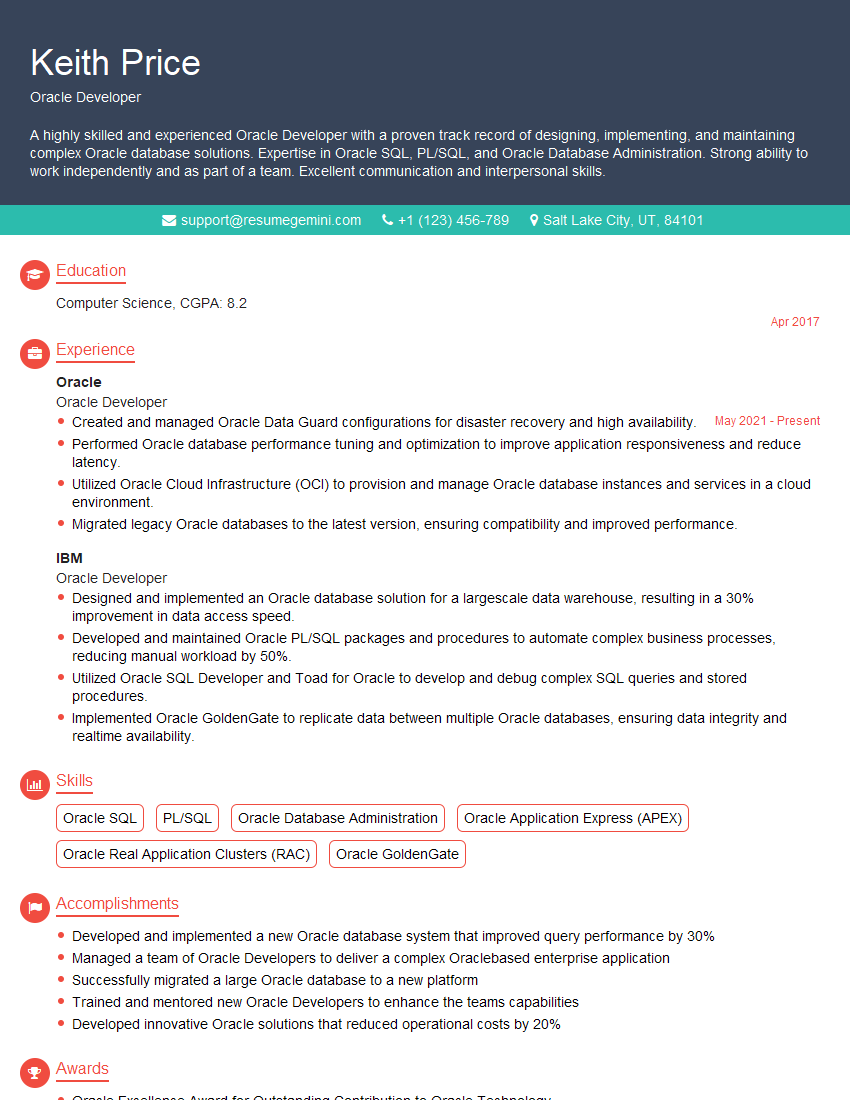
Mastering Oracle skills opens doors to exciting career opportunities and significant salary growth. To maximize your chances of landing your dream job, invest time in creating a compelling, ATS-friendly resume that showcases your skills and experience effectively. ResumeGemini is a trusted resource to help you build a professional resume that stands out. They offer examples of resumes tailored to Oracle professionals, providing a valuable template and guidance to get you started.
Explore more articles
Users Rating of Our Blogs
Share Your Experience
We value your feedback! Please rate our content and share your thoughts (optional).
What Readers Say About Our Blog
To the interviewgemini.com Webmaster.
Very helpful and content specific questions to help prepare me for my interview!
Thank you
To the interviewgemini.com Webmaster.
This was kind of a unique content I found around the specialized skills. Very helpful questions and good detailed answers.
Very Helpful blog, thank you Interviewgemini team.